Hang Seng Bank Securities Services

GreenTomato Limited  |  Mobile App  |  Fintech

Project Overview
01
Hang Seng Bank Securities Services is a mobile trading platform designed to help customers manage investments and stay informed on market activity through a more accessible mobile experience.

Working on this through Green Tomato meant embedding with the client's business unit and navigating their internal processes while keeping the design work moving. The environment was structured and constraint-heavy, stakeholder sign-off was required at multiple stages, and product requirements came with real delivery timelines attached. That shaped nearly every decision in the project.

The feature saw a 22% increase in trading activity and receiving a 4.8/5 user satisfaction score post launch.
Company
Hang Seng Bank
Tools
Sketch,
Invision Studio,
Zoom
Roles
End-to-End UX Design,
UX Research & Strategy
Deliverables
User Journey Maps,
Wireframe,
High-Fidelity UI,
Interactive Prototype
The Challenge
02
Simplify complex financial tasks
The existing app buried the most-used tasks like searching a stock, checking a quote, placing a trade behind too many steps for something users were doing daily.
1
Design for clarity and trust
Trading decisions carry real financial weight. The design had to communicate data accurately and clearly, without creating doubt or confusion at the moments it mattered most.
2
Work within business constraints
Product requirements were fixed, timelines were tight, and decisions needed stakeholder buy-in. Working within those constraints was part of the job.
3
Problems Discovery
03
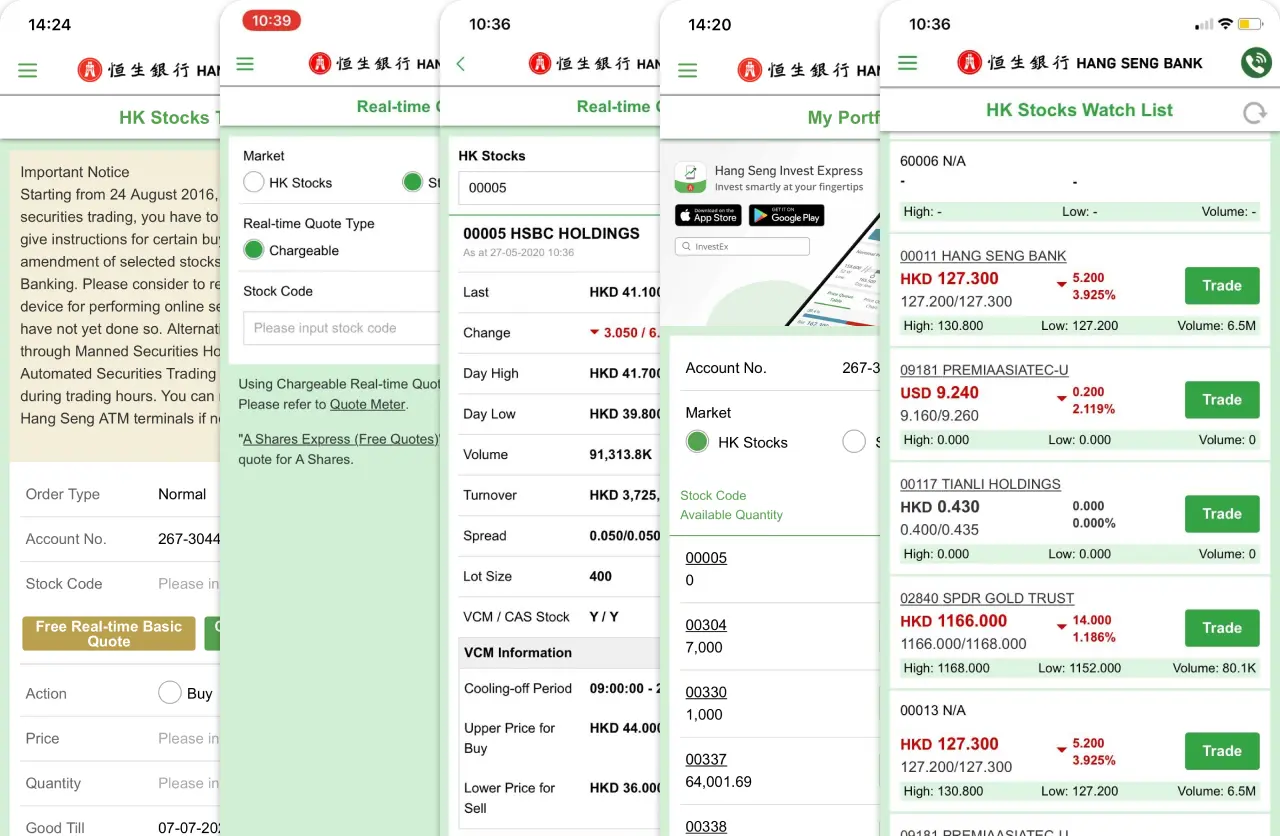
I started by auditing the current app, running a competitor review against platforms like Futu Bull and Robinhood, and pulling together available user feedback. The goal was to find the pattern, not just a list of issues, but the underlying reason the experience wasn't working.
Current App
Competitors
Key Insights
1
Financial information was hard to scan
The quote screens were data-heavy with no clear visual hierarchy. Users had to hunt for the number they needed rather than landing on it immediately. It's a real problem when market timing matters.
2
Key workflows involved unnecessary friction
Getting from 'I want to place a trade' to a confirmed order involved more steps than it needed to. Each unnecessary tap added friction to something users were doing under time pressure.
3
Users needed greater clarity and confidence
Trading is high-stakes. Users needed to feel confident in what the screen was telling them before acting on it. The current design created too much room for doubt.
Make key actions easier to progress through
Cut the steps. The core journeys: search, quote review, trade placement should move quickly and feel native to how people use mobile apps.
1
Prioritize decision-critical information
Restructure the information hierarchy so the data users need to make a decision is visible without scanning. Get the most important numbers front and centre.
2
Reinforce clarity through consistency
Standardise patterns across screens. When users encounter the same type of information repeatedly, it should always look and behave the same way.
3
Design Process
04
Research told us what was broken. These process are about how we figured out what to actually do about it, including one proposal that didn't make it through.
Working with the quote screen hierarchy
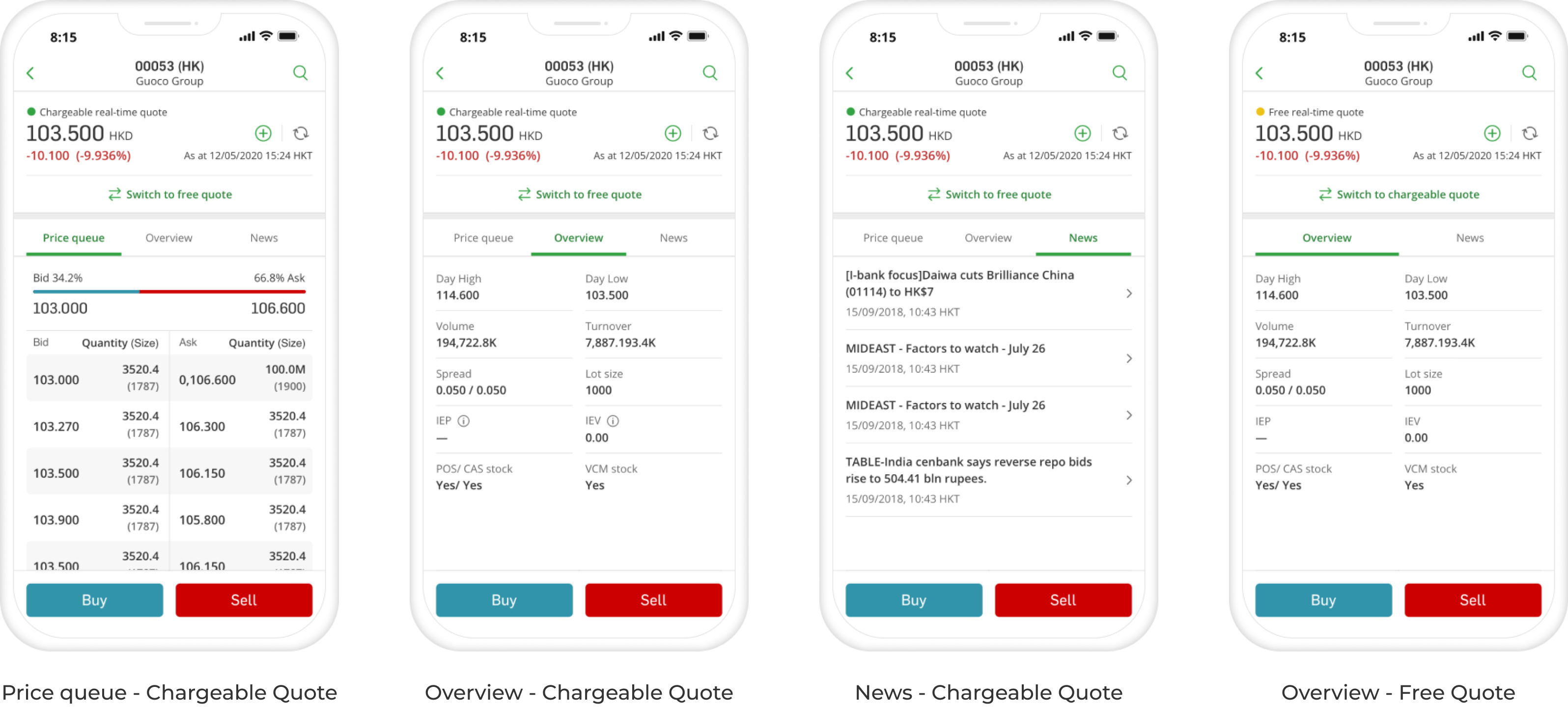
The original quote screen was structured like a spreadsheet, every number at the same size and weight, no signal for what mattered. The redesign fixed the hierarchy around one priority: stock name and price prominent at the top, everything else secondary.

One thing we wanted but couldn't get was live price refresh. Since the data couldn't update automatically, we moved the refresh button and timestamp directly adjacent to the price — so the prompt to refresh lived exactly where users were looking when they decided to act.
Closing the gap between research and trade
In the old flow, viewing a quote and placing a trade were completely disconnected. After checking a stock price, users navigated to the trading screen through the side menu and started the form from scratch with no prefilled stock code, no price reference carried over.

We added a sticky Buy / Sell button on the quote page that opens the trading screen with the stock code already populated. We also added quick-select buttons next to the key fields in the trading form so users could pull data in from the quote without retyping it. Two small changes that removed the biggest friction point in the core task.
A proposal we believed in, and why it didn't ship
The logical extension of closing that quote-to-trade gap was to remove it entirely. We proposed embedding the trade form in the quote page as a bottom sheet — tap Buy or Sell, the form slides up in context, you place the trade without ever leaving the screen. It would have been a significantly faster experience, and the interaction pattern was sound.

The business team didn't approve it. There were compliance considerations around how the trade confirmation flow had to be structured, and requirements around how trading actions needed to be presented that the bottom sheet model couldn't accommodate. We didn't agree with every constraint, but we understood why they existed. The sticky button approach became the right compromise, it removed the navigation burden without touching the compliance-sensitive parts of the flow.
Final Design
05
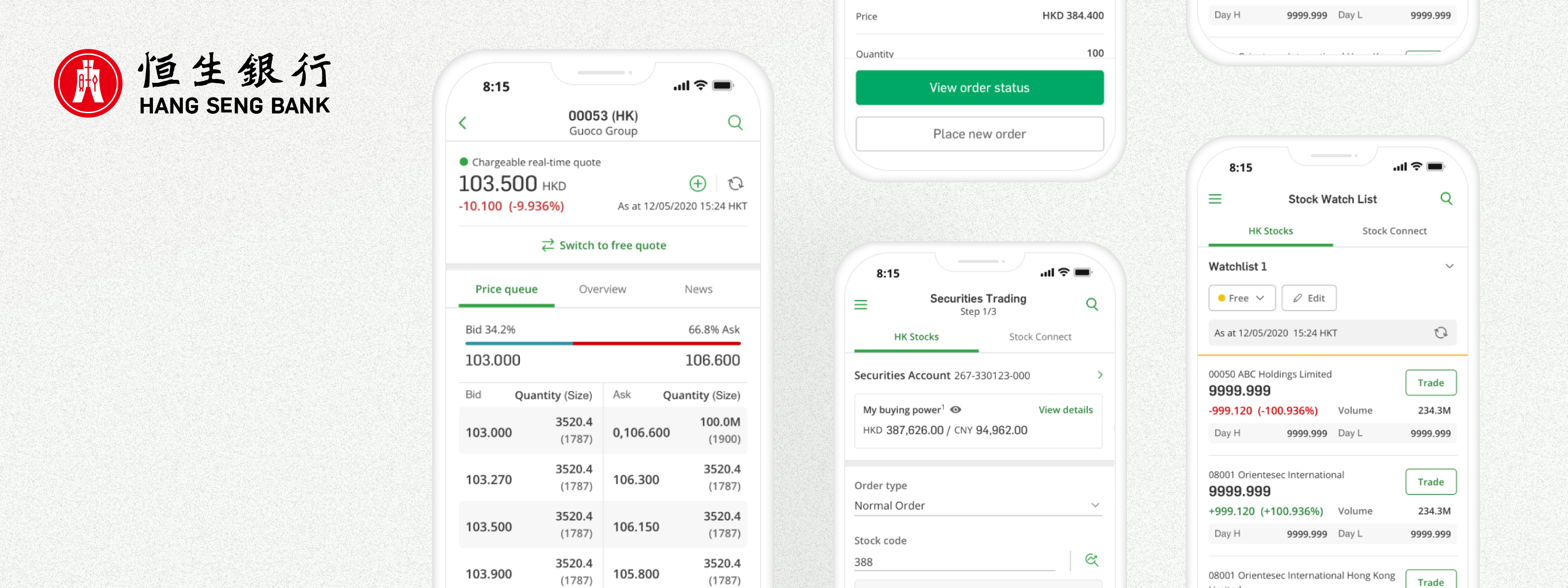
The final designs addressed the three problem areas directly: the quote screens were restructured for faster scanning, the trading flows were cut down to the minimum steps required, and the interaction patterns were standardised so users could move through the app without relearning how things worked on every screen.
Improved stock search and quote review
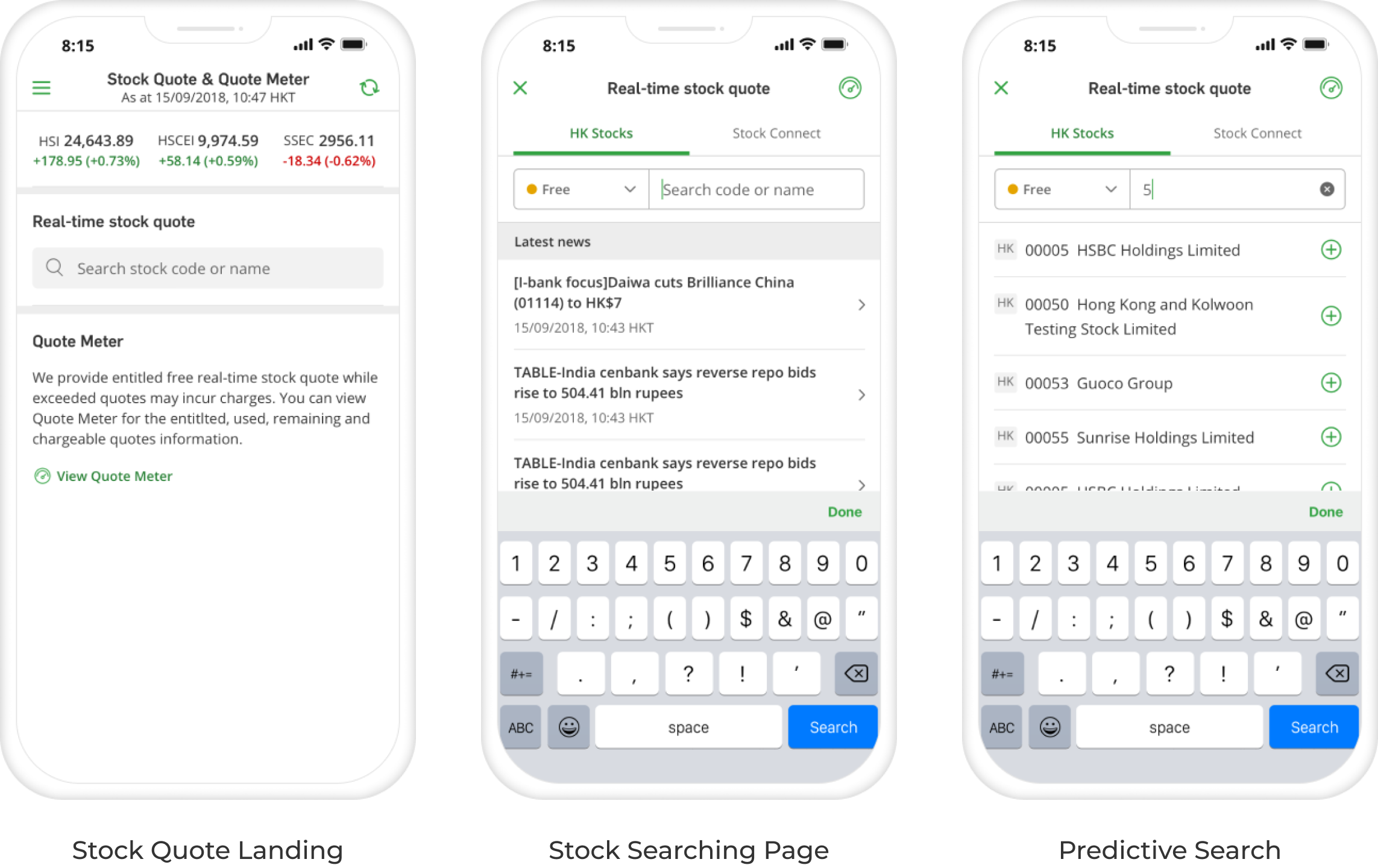
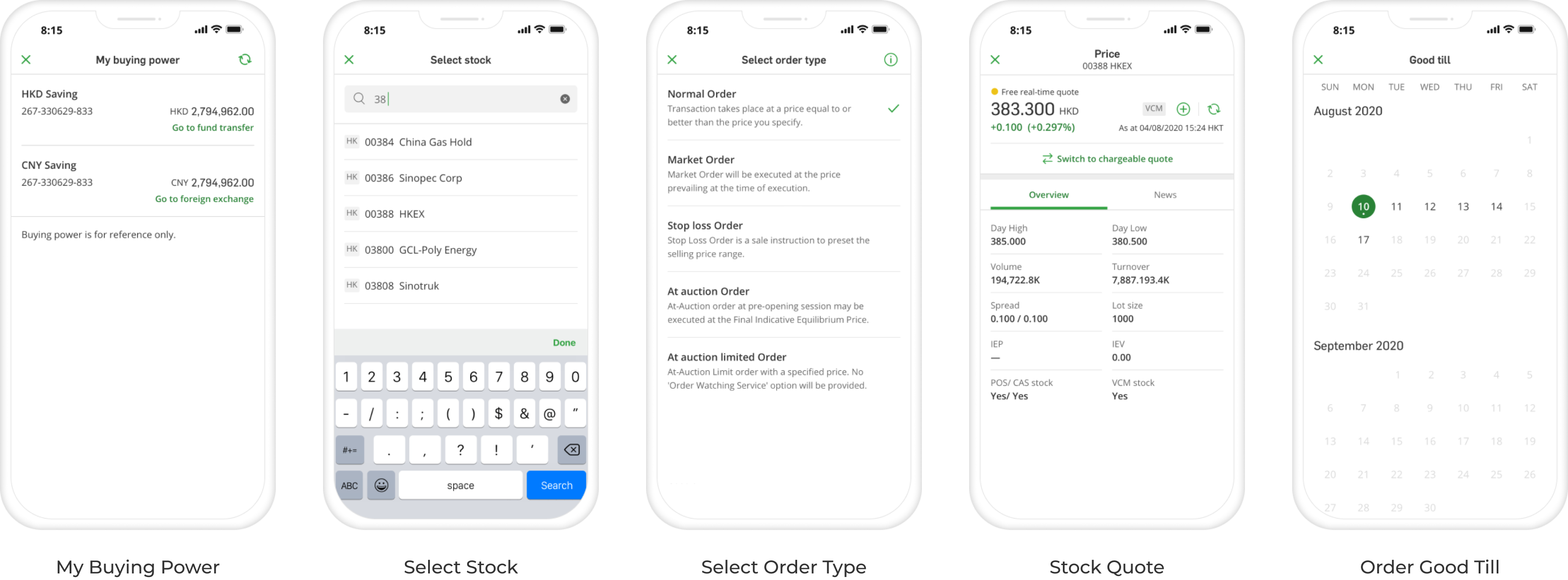
The original quote screen presented everything at the same visual weight: price, volume, news, queue data, all competing equally. The redesign created a clear hierarchy: the most time-sensitive data up top, supporting context below. Predictive search also reduced the steps to get there in the first place.
Streamlined trading journeys
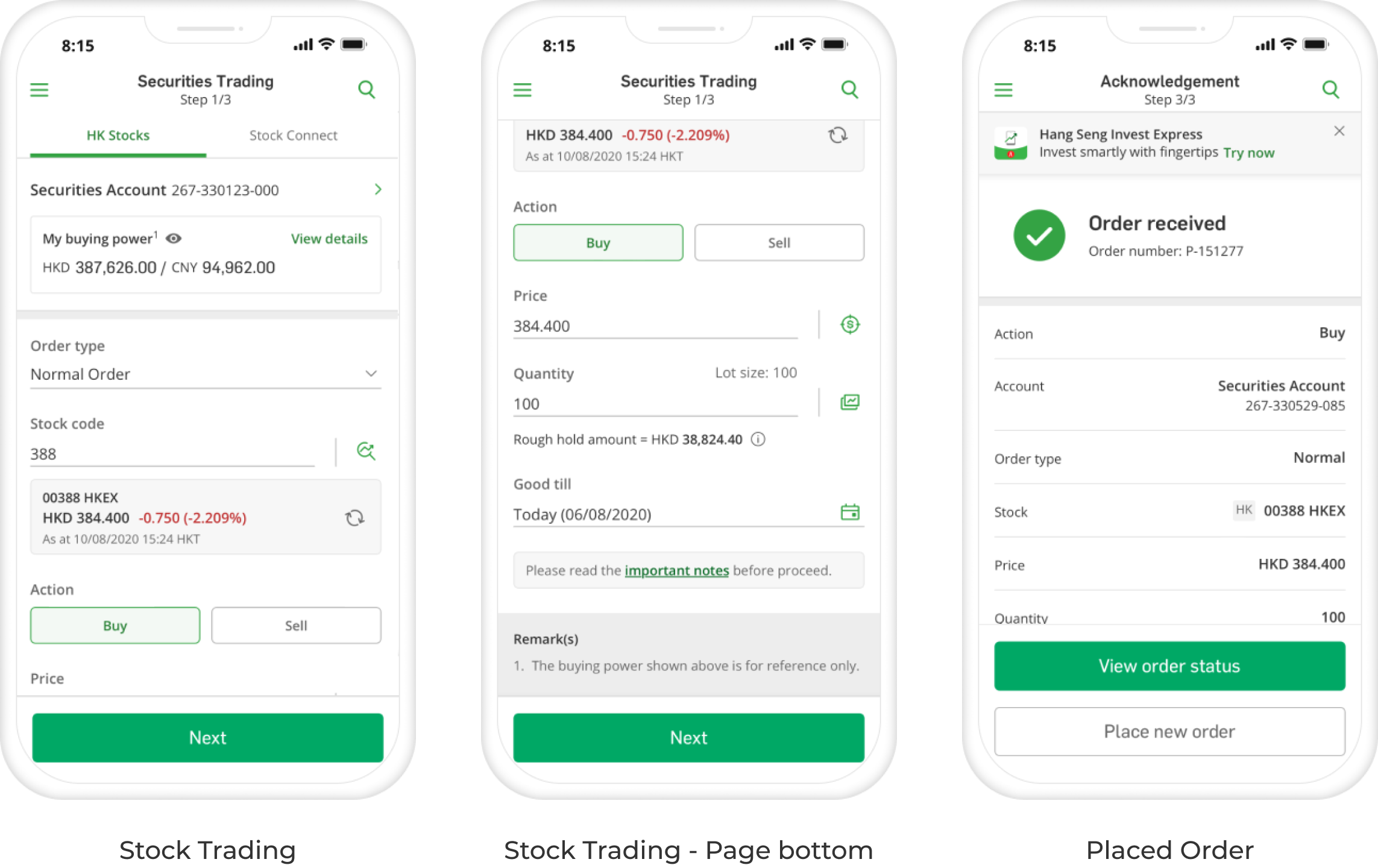
The trading flow was broken into clearly separated steps: Account, Order type, Quantity, Confirmation, so users could move through each decision deliberately without losing track of where they were or what they'd already entered. The order confirmation screen was also designed to give users a moment to review before committing.
Enhanced support features
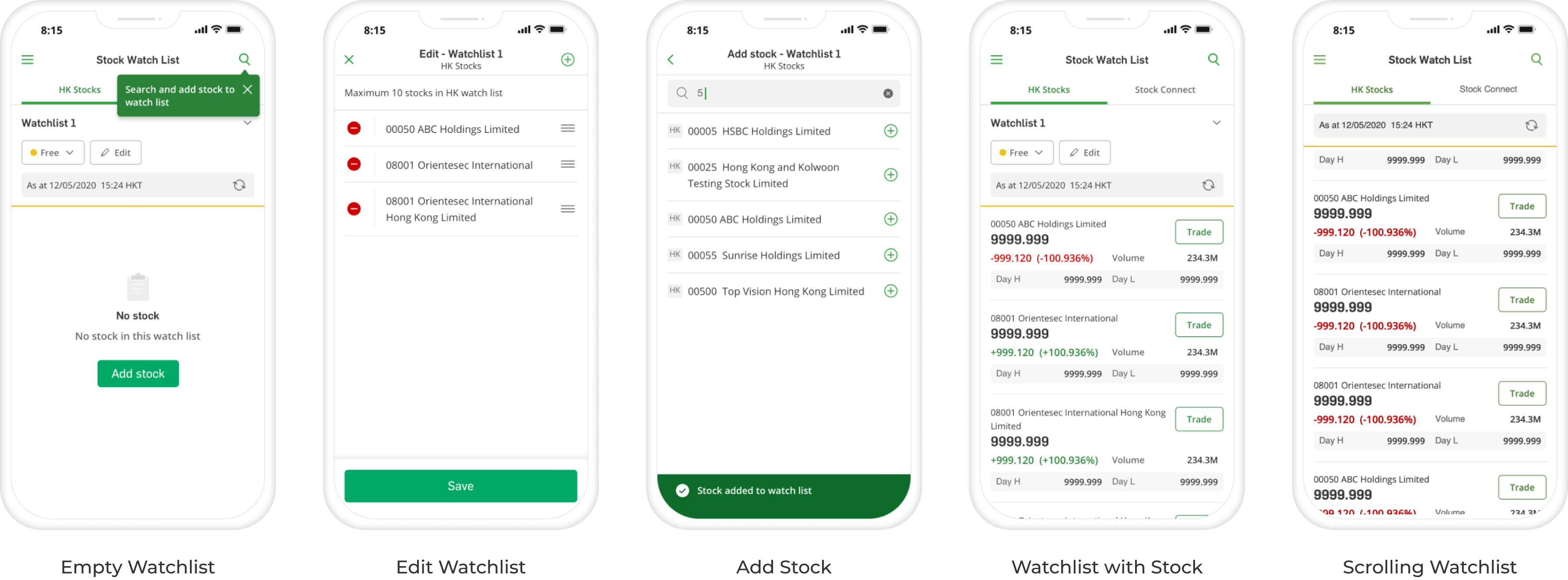
Watchlists were a commonly requested feature that the current app handled poorly, adding stocks was unintuitive and the list views were hard to scan. The redesign gave them a proper empty state, clean edit controls, and a layout that surfaced the key quote details at a glance.
Outcome & Reflection
06
Outcome
The redesigned mobile experience led to measurable improvements after release. The feature saw a 22% increase in trading activity.

User feedback was also positive, with the product receiving a 4.8/5 user satisfaction score in a post-release survey. These results showed that improving clarity, usability, and flow could create value for both customers and the business.
Reflection
Working inside a large financial institution as an outside contractor meant I was never fully in the room where decisions got made. That was a real constraint. A lot of my energy went into making the design rationale legible to people who weren't thinking about UX day-to-day, stakeholders who needed to understand why a change was worth it, not just what it looked like. That skill: Translating design thinking into business language, ended up being as important as the design work itself.
Back to Home